
Accidentally Discovered the Ultimate Way to Rig Glasses
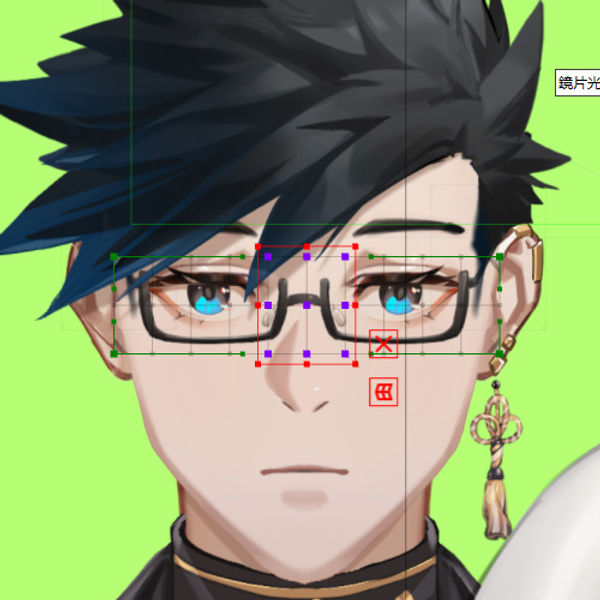
While rigging some glasses, I suddenly had an idea for a decent approach, so I tried it out on Snakeskin-sensei's model and it actually seems to work!
First, add some extra points to the glasses object however you like.
Create the overall surface for the glasses — no need to change the surface size.
Adjust the mesh subdivision count so that the 9 selected points in the diagram fully wrap around the bridge of the glasses frame.
Then set the Bezier subdivision to 1x1.
After that, you can start keyframing under X and Y.
First, on the X axis, when turning to the side, draw a vertical guide line at the center of the nose.
Line the center of the glasses surface up directly with that guide line.
Select from the center, add one extra column to the left, and compress the whole thing slightly.
Then select the center again, and compress it slightly.
Give the whole eye area a slight rotation.
Then pull the bottom-left corner down just a bit.
Pull the bottom-right corner up just a bit.
Then pull the bottom-right corner in just a bit.
Flip it, and — done!!!!
Done!!!
Done!
Done!
...Done!
Not sure why, but it's fast AND accurate XD just needs a bit of detail and position tweaking afterward.
For the Y axis:
When looking up, shift the surface upward, compress the whole thing, pull the top two points inward, and pull the bottom two points outward.
When looking down, do the opposite — compress the whole thing, pull the bottom two points inward, and pull the top two points outward.
Blend the four corners together, fine-tune each corner a little, and you're done!!
Done!
Done!
I'm calling this the "Thya Speedrun Method" for glasses lol, it's just so convenient I had to share it right away (and knock out this week's log while I'm at it XD)
Keep reading
-

[Animation Class, Session 6 Enrollment]
An update on the Session 6 Animation Class course image: the collaboration illustration has been replaced, while scholarships and event rules stay the same.
-

[Animation Class Cohort 6 Enrollment] Day 5: Refined large-format reference sheets are ready
Day 5 of Animation Class Cohort 6 enrollment, featuring refined reference sheets and a back-view illustration provided by 馬吉Machi老師.
-

[Animation Concept Class, Phase 6 Enrollment Open]
Enrollment for Animation Class Phase 6 has been open for a week. This announcement introduces the collaboration with Meridian Project and the back-view reference by 祈Iruni, with a NT$20,000 scholarship for the selected work.