
How to Configure Live2D Memory Settings
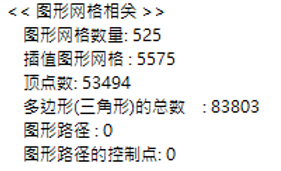
I have 32GB of RAM, but for some reason, Live2D was constantly maxing out at 30GB. The lag was so brutal I was ready to throw my PC out the window....
I tried searching around in Chinese, but it was super hard to find any info and nobody was really talking about it. (Does this issue only happen to certain people??) I eventually tried searching in Japanese, and it turns out you can actually configure Live2D's memory allocation! :0!!!
For whatever reason, my computer starts lagging the second my memory usage crosses 21GB. Q_Q
I'll share the link to the official Japanese tutorial >> right here
At the end, it says to drop the file into your Live2D Cubism X.X folder, where X.X is your version number.
So basically, after you edit the file, you just toss it directly into the root folder (I spent way too much time wondering which folder X.X was lol).
Since I have 32GB, I set my MAX_MEMORY to 25000.
After making the change, my memory usage magically dropped...
Before configuring this, having Live2D open with my project file was eating up 21GB.
After configuring it, keeping the project file open only takes up 8GB, and everything runs way smoother.
Although, if your model has an insanely high triangle count... it's still going to lag....
But at least for now, opening my teacher's files doesn't lag anymore. This setting is an absolute lifesaver :0
▼ Because I was creating all the meshes manually, the lag was absolute garbage... (I really wanted to cry.) Honestly, I have no idea how the poly count got this high in the first place.
Keep reading
-

[Animation Class, Session 6 Enrollment]
An update on the Session 6 Animation Class course image: the collaboration illustration has been replaced, while scholarships and event rules stay the same.
-

[Animation Class Cohort 6 Enrollment] Day 5: Refined large-format reference sheets are ready
Day 5 of Animation Class Cohort 6 enrollment, featuring refined reference sheets and a back-view illustration provided by 馬吉Machi老師.
-

[Animation Concept Class, Phase 6 Enrollment Open]
Enrollment for Animation Class Phase 6 has been open for a week. This announcement introduces the collaboration with Meridian Project and the back-view reference by 祈Iruni, with a NT$20,000 scholarship for the selected work.